The easiest route is to let the agent you already use do the setup. Paste the prompt into Claude Code, Codex or
another agent with shell access on the machine that should host sessions. It asks for approval before it installs
the login service or any runtime hook.
Check the seal before you open the crate.
install prompt
Install pohunek (https://github.com/zajca/pohunek) on this machine and set it up
so you can drive it.

Read these first and follow them, they are the source of truth:
- https://raw.githubusercontent.com/zajca/pohunek/main/docs/install.md
- https://raw.githubusercontent.com/zajca/pohunek/main/docs/knowledge/guides/setup.md
- on macOS also https://raw.githubusercontent.com/zajca/pohunek/main/docs/knowledge/runbooks/install-on-macos.md

Rules:
1. Detect the OS and CPU. Linux x86_64 uses the latest release's
   pohunek-daemon-<version>-x86_64-unknown-linux-gnu.tar.gz (or -musl).
   macOS 14+ on Apple Silicon uses `brew install zajca/pohunek/pohunek`;
   tell me that macOS support is not declared final yet. For anything else,
   stop and tell me.
2. Verify every download with its .sha256 file and, when `gh` is available,
   `gh attestation verify <file> --repo zajca/pohunek`. Stop on any mismatch.
3. Before changing anything, run `pohunek service check --json` (from the
   extracted archive on Linux), show me what will be installed where, and wait
   for my approval. Then install the login service (`./packaging/install-daemon.sh`
   on Linux, `pohunek service install` on macOS). Never pass
   --accept-runtime-loss, --stop-sessions, or --purge. When an upgrade refuses
   with `service_upgrade_sessions_at_risk`, show me the listed sessions and
   reason codes instead of overriding it.
4. Verify with `pohunek doctor --json`, `pohunek service status --json`,
   `pohunek health --json`, and `pohunek host inspect local --json`. Report
   every warning; fix only what I approve.
5. Ask me before running `pohunek integration install --agent <runtime>`: it
   has no dry run and installs a SessionStart hook into that runtime's config
   home (for Claude Code `~/.claude`, for Codex `~/.codex`). Claude Code and
   Codex are served only by their official packages, so their hooks install
   only after the package does. Tell me which runtimes and configuration files
   it will touch and wait for my approval.
6. Run `pohunek agent-skill` and save its output as a skill or instruction file
   in your own harness, so later sessions know how to drive pohunek. Tell me
   where you saved it.
7. If this machine is in a NetBird network, run
   `pohunek host discover --refresh --json` and list the hosts that already run
   pohunek.
8. Never put secrets into commands, logs, or your summary. End with the
   installed version, paths, open warnings, and next steps.
Repeat it on every machine that should host sessions. Remote hosts must join the same NetBird network.
Desktop companion
Install from the companion
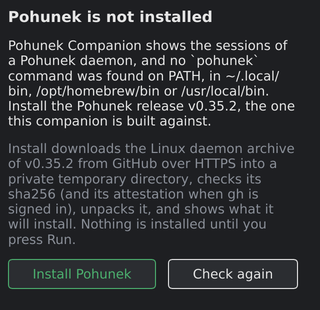
Start the desktop companion on a machine without pohunek and
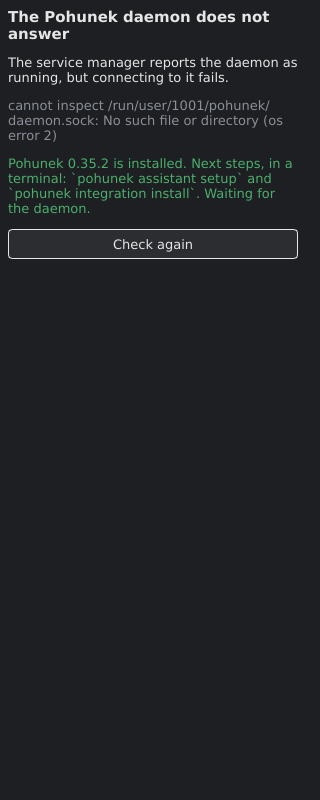
it opens a setup screen instead of the session list. It names what is missing: the pohunek command,
the login service, or a running daemon, and offers to fix it after showing the exact command and what it touches.
Install the companion. On macOS brew install zajca/pohunek/pohunek-companion; on
Linux x86_64 the release archive from
pohunekd/pohunek-companion.
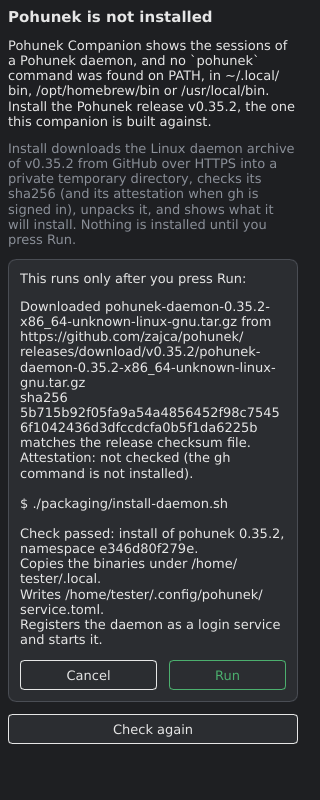
Press Install. On Linux it downloads the pohunek release the companion is built against (never
"latest") over HTTPS and checks its sha256, and its build attestation when gh is signed in. On macOS
it runs brew install zajca/pohunek/pohunek.
Review, then Run. It shows what the installer will write and runs it only after you press Run and
confirm. A checksum mismatch refuses the install.
Done. The setup screen gives way to the session list as soon as the daemon answers.
pohunek is missingVerified, ready to runInstalled
Manual
Install by hand
Linux x86_64
Verified download of the daemon archive (glibc; a -musl archive is published too), then the bundled
installer copies the binaries under ~/.local and registers the login service. It needs systemd 255 or
newer.
linux
gh release download v0.35.2 -R zajca/pohunek -p 'pohunek-daemon-0.35.2-x86_64-unknown-linux-gnu.tar.gz*'
sha256sum -c pohunek-daemon-0.35.2-x86_64-unknown-linux-gnu.tar.gz.sha256
gh attestation verify pohunek-daemon-0.35.2-x86_64-unknown-linux-gnu.tar.gz --repo zajca/pohunek
tar -xzf pohunek-daemon-0.35.2-x86_64-unknown-linux-gnu.tar.gz
cd pohunek-daemon-0.35.2-x86_64-unknown-linux-gnu
./pohunek service check        # shows what will be installed where
./packaging/install-daemon.sh  # installs the CLI and the login service
pohunek doctor
macOS (Apple Silicon)
macOS 14 or newer, tested on macOS 15. Install from the tap, then install the login service.
macos
brew install zajca/pohunek/pohunek
pohunek service install
pohunek doctor
The full procedure, including archive verification, the login service, upgrades and runtime packages, is in the
install guide.
 pohunek